






See where your bundle buyers are
 Bundles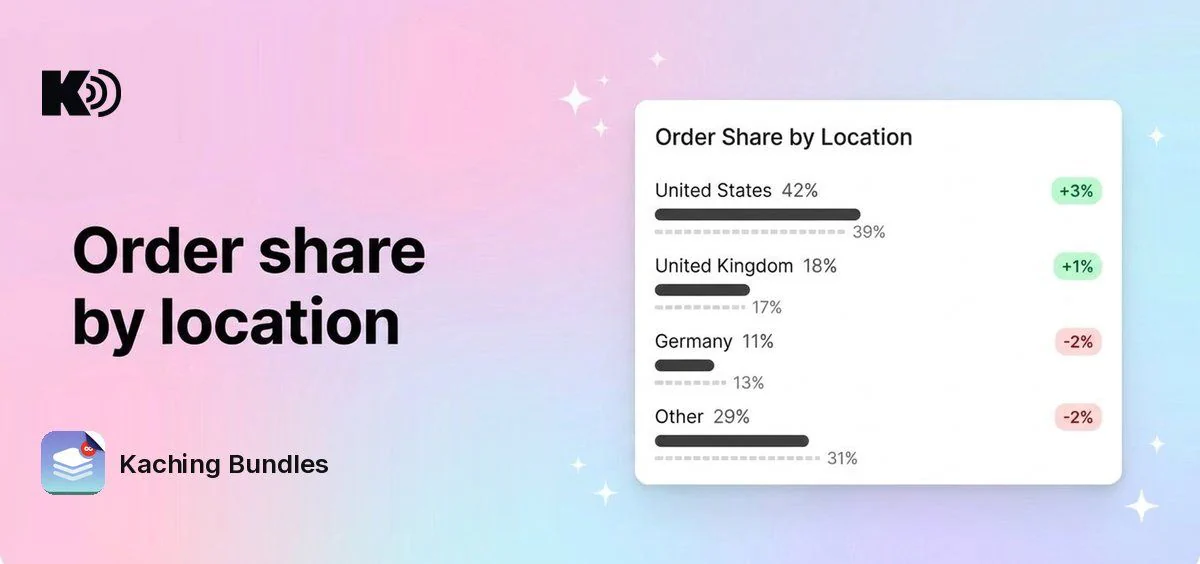
Before, Analytics showed how many orders your deals got, but not where the buyers are. To see that, you had to go to Shopify Analytics, where the numbers are not limited to your deals.
What's new
- Order Share by Location: the 3 countries with the most orders from your deals, plus all other countries together as "Other".
- Compare periods: turn on a comparison period to see a second bar for each country and how its share changed.
- Country names in your language. Hover a bar to see the number of orders.
Why it matters
You see which markets buy your bundles. Use it to choose where to advertise, which language to translate your deals into, or whether a new shipping zone works.
How to use it
Open Analytics in Kaching Bundles. The card is next to the Funnel and Quantity by Order Share cards, and uses the date range and deal filter at the top of the page.
The country comes from the shipping address, or from the billing address when there is no shipping address. Location data has been collected since 31 August 2026, so orders placed before then are not in the card.