






See which A/B test variant wins, and why
 Bundles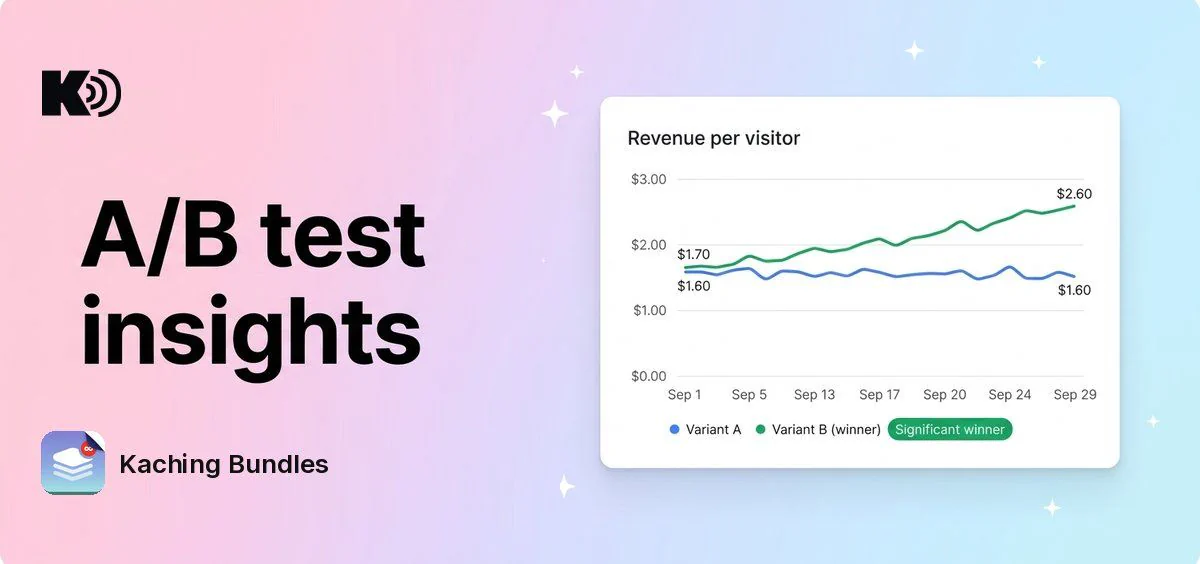
Before, an A/B test showed only lifetime totals for each variant, and the winner was the variant with the best conversion rate. Now you see how each variant performs over time, and the winner is the variant that earns the most per visitor.
What's new
- A line for each variant: on the Analytics page, select a deal with an A/B test and turn on A/B test insights. The Metrics over time chart draws one line for each variant, for any date range.
- Every metric for each variant: switch between revenue, conversion rate, AOV, add-to-cart rate and the other metrics, the same as for a whole deal. A removed variant shows as a dashed line.
- Winner by revenue per visitor: a variant that converts a little less often but sells a bigger bundle can now win. Subscription revenue counts too.
- Revenue per visitor in your lists: the deals list and the A/B test archive show the revenue per visitor column by default.
Why it matters
Conversion rate alone can pick the variant that earns less. Revenue per visitor shows which variant brings more money from the same traffic, and the chart shows when a variant pulled ahead.
How to use it
Open Analytics, select a deal with a running or ended A/B test, and turn on A/B test insights next to Export as CSV.
The Significant winner badge shows when every variant has at least 25 orders and the lead is large enough to trust. You still choose when to end the test and which variant to keep.
If you changed the columns in your deals list before, your choice stays.