







Let shoppers choose their delivery plan from the sticky add to cart bar
 Subscriptions
Shoppers no longer have to scroll back up to your widget to change how often they get deliveries. The sticky add to cart bar now lets them pick a delivery plan and see what it costs, right where they are.
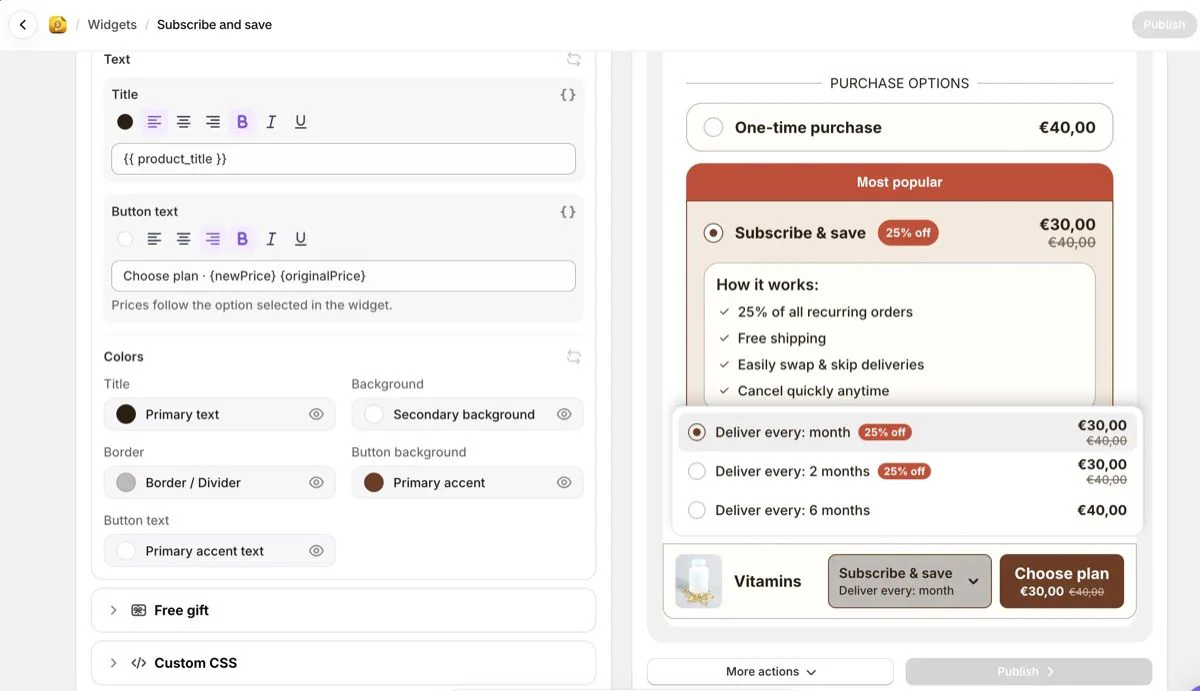
- Choose a delivery plan in the bar. When Subscribe & save is selected and the product has more than one delivery option, the bar shows a dropdown with each option, its discount and its price. Picking one also updates your widget, so your theme's Add to cart adds the plan the shopper chose.
- Show the price on the button. Add
{newPrice}to the button text to show the selected option's price, and{originalPrice}to show the full price struck through when there's a discount. The price follows the variant and quantity the shopper picked. New widgets start with "Choose plan · {newPrice} {originalPrice}". For an existing widget, add the variables to its button text. - Matches your widget. The dropdown uses your widget's colors and text, in the shopper's language, so there's nothing new to set up.
With One-time purchase selected, or on a product with a single delivery option, the bar looks the same as before. The button still scrolls shoppers back to your widget, so your theme's Add to cart and tracking work as usual.
You'll find it under Widgets: open a widget, go to the Design tab and open Sticky add to cart.