






Ask AI to set up an A/B test
 Bundles
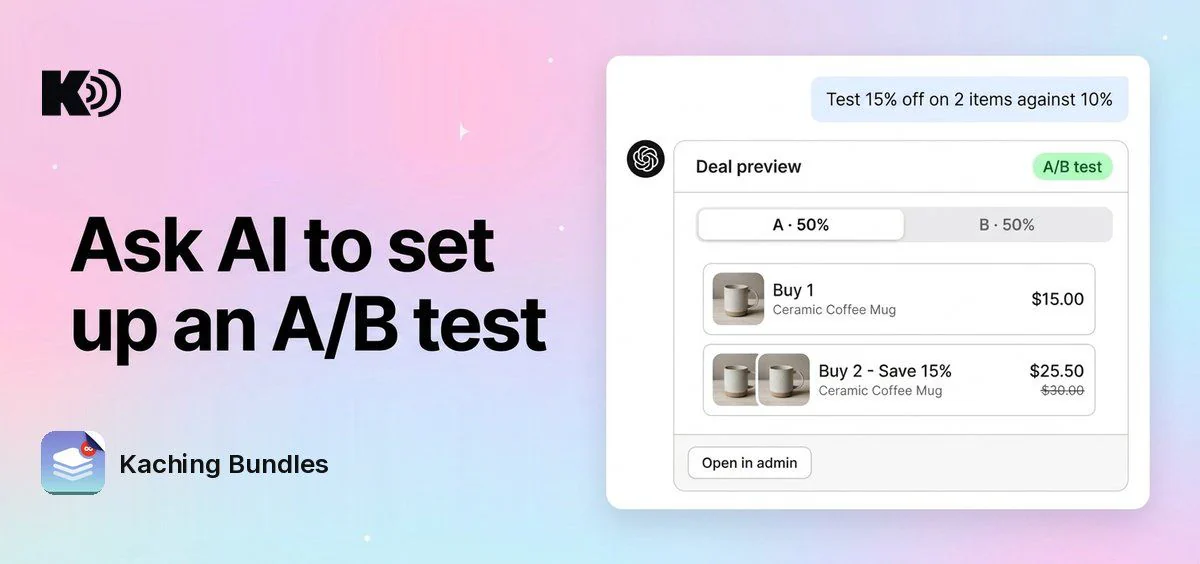
Before, you set up an A/B test by hand: click Setup A/B test, then change variant B setting by setting. Now you tell Ching or Sidekick in the deal editor, or Claude, ChatGPT or another AI tool connected to Kaching MCP, what to test, and it adds the variant for you.
What's new
- Ask for a test in your own words: "Test 15% off on 2 items against 10%." Variant B is added as a copy of variant A with that one change. Ask again for variant C or D, up to 4 variants.
- Set the traffic split: "Give B 30% of visitors." This sets the share of visitors the variants other than A get, from 5% to 95% in steps of 5%.
- With Ching or Sidekick, see it before you save: the editor switches to the new variant, the preview shows it, and the save bar opens. Nothing is saved until you click Save, and the test starts when the deal is published, the same as with Setup A/B test.
- From Claude or ChatGPT, on a draft deal: the variant is saved at once and the deal stays a draft. The test starts when you publish the deal in the Kaching Bundles editor.
- See every variant in the chat: in AI tools that show app cards, like Claude, the deal preview card shows an "A/B test" label and a tab per variant with its share of visitors, for example "A · 50%". A deal with a test has no Publish on the card: click Open in admin to publish or change it in the editor.
- Ask about a test you already have: "Is my split test set up right?" or "What does B change?" Ching, Sidekick and AI tools connected to Kaching MCP see each variant, the traffic split, what each variant changes from A, and whether the test is running.
Why it matters
You go from an idea ("would a bigger discount sell more?") to a ready test in one message, and every variant differs from A by exactly the change you asked for, so the result tells you which change won.
How to use it
In the deal editor, open a deal, click Ching at the bottom right or open Sidekick, and ask for the test, for example "Test the title Buy more, save more against my current title."
In Claude, ChatGPT or another AI tool, ask for the test on a draft deal, for example "In my Summer sale draft, test 20% off on 3 items against 15%." To connect your AI tool: How to connect to Kaching MCP.
Settings that are the same on every variant, such as the products, markets, start and end dates and discount combinations, cannot change per variant. Claude and ChatGPT add variants only to draft deals: for a live, scheduled, paused or expired deal, set up the test in the editor, or duplicate the deal as a draft. Tests are not ended from a chat: to end one, click Stop A/B test above the preview in the editor.