



Quantity and discounts on the Alternative product bar
 Bundles
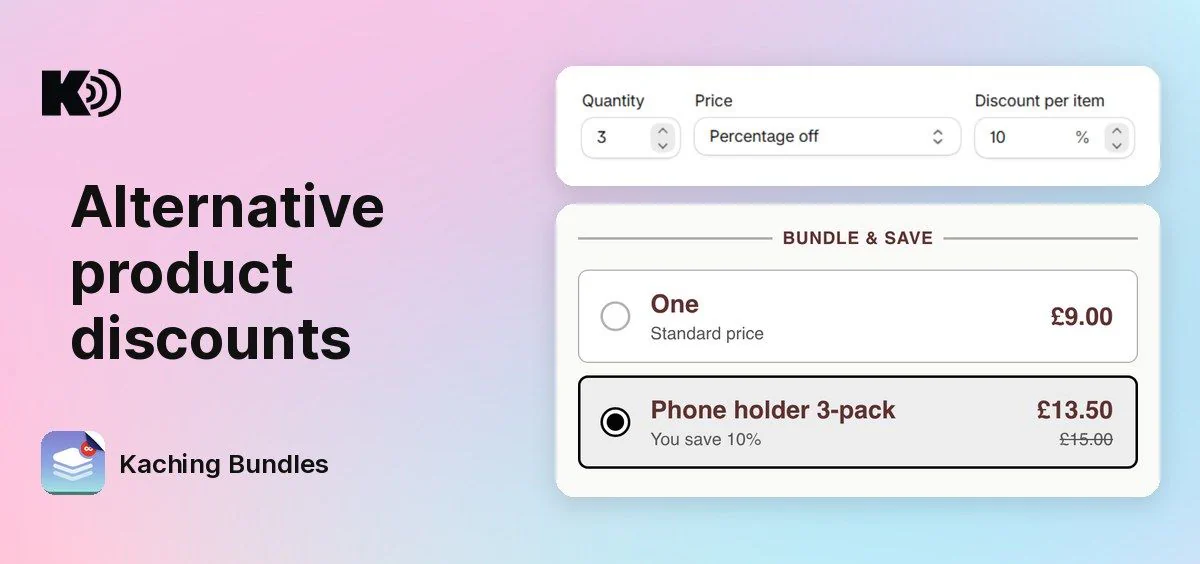
Before, the Alternative product bar always sold 1 unit of its product at full price. Now you choose how many units the bar sells and at what price, with the same options as a quantity break bar.
What's new
- Quantity: the bar can sell 2, 3 or more units of its product, for example a 3-pack of refills on your starter kit page.
- Price: pick Full price, Percentage off, Amount off or Fixed price. Shoppers see the discounted price with the full price crossed out.
- Same price in the cart: the cart gets the number of units that the bar shows, and checkout gives the same discount as the widget.
Why it matters
You can offer a bigger pack or a better product as a real deal, not only as a link to another product at full price. The discount gives shoppers a reason to pick the bar.
How to use it
Open your deal, open the Alternative product bar (or click Add bar and pick Alternative product) and set Quantity, Price and the discount. Save, and the widget shows the new price.
Your current Alternative product bars do not change: they still sell 1 unit at full price until you change them.
All units of the bar are the same variant, the one that the shopper picks. Free gifts and upsells on the bar work as before.