






Shopify Flow actions
 Subscriptions
Kaching Subscriptions now adds six actions to Shopify Flow, so a workflow can change a subscription as well as react to one. In Flow, add a Kaching Subscriptions action after any trigger and fill in the subscription it should act on. Our triggers already send the Subscription contract ID, so you can pick it with Add variable.
Actions
- Pause subscription, until someone resumes it or for 1, 2 or 3 deliveries.
- Resume subscription.
- Cancel subscription, with an optional reason and the option not to email the customer.
- Add line item: adds a product variant at the quantity you set. Leave the price empty to use the variant's price for the subscription's market, or set your own, including
0for a free item. - Update line item: changes a product's variant, quantity or price.
- Remove line item: removes a product. The subscription's last product is never removed.
Update and Remove act on one line, named by its Line ID. Every trigger's line items now include Line ID and Is gift, so you can loop over the line items with For each, add a condition, and pick exactly the lines you want. Free gift lines are never changed by a workflow.
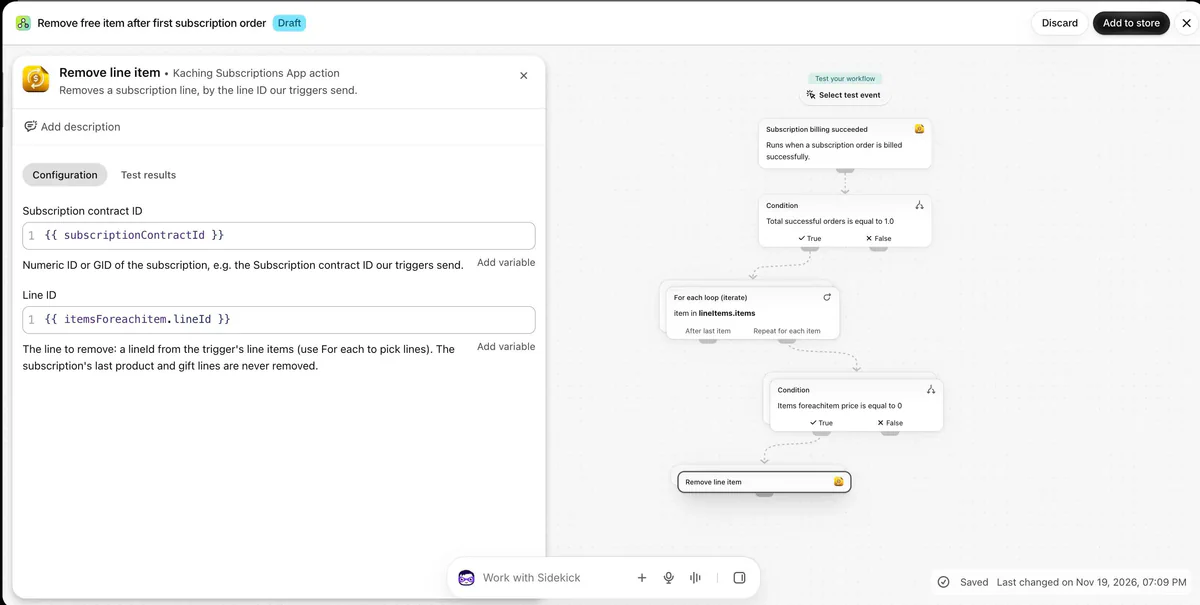
Each change appears on the subscription's timeline, marked as made by Shopify Flow. Available on every plan.
What you can build
- Add or remove products. Buy one, get one free on the first order, then only the paid unit. A gift on the first shipment only. Shipping protection only while the main product is on the subscription.
- Change prices. A fixed renewal price, whatever the first order cost. A price rise for existing subscribers as their next order comes up.
- Swap products. A grinder on the first order, then the refill. A monthly rotation from A to B to C.
Use Subscription billing succeeded and its order count to act after a given order.
See all six actions in Settings → Integrations → Shopify Flow.