





Post Purchase pixel
Tracking post purchase conversions is different from regular user tracking in your store.
Tracking post purchase conversions is different from regular user tracking in your store.
Shopify supports two types of pixels:
- App pixels - these are automatically installed through marketing or analytics apps.
- Custom pixels - These pixels are manually created and managed in the Customer events section of your Shopify admin.
But neither of those works with post-purchase conversions.
In order to capture Post Purchase conversions, you need to listen to the CheckoutAmended event. It is a special Shopify Checkout Extension event that fires when an order is updated after checkout, such as when a post-purchase upsell is accepted.
In order to utilize upsell Purchase events, you must use the Post-purchase page Additional scripts field. You can find it in admin Settings -> Checkout -> Post-purchase page:
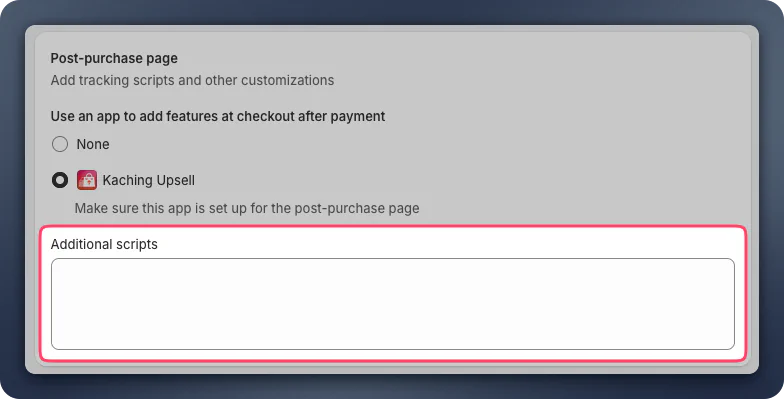
Important notes for scripts field:
- Shopify liquid is not supported
- It's allowed to use only `<script>` HTML tag. Anything else is not supported.
- Script runs in hopify sandbox, so there's no possibility to access any data from DOM.
Example - Google Analytics:
<!-- Google tag (gtag.js) -->
<script async src="https://www.googletagmanager.com/gtag/js?id=G-XXXXXXXXXX"></script>
<script>
  window.dataLayer = window.dataLayer || [];
  function gtag(){dataLayer.push(arguments);}
  gtag('js', new Date());

  gtag('config', 'G-XXXXXXXXXX');
</script>

<script>
  Shopify.on('CheckoutAmended', function(updatedOrder, oldOrder) {
    const originalOrder = oldOrder.order || oldOrder;
    const originalItems = originalOrder.lineItems.map(function (line) {
      return line.id;
    });

    const addedItems = updatedOrder.lineItems.filter(function (line) {
      return originalItems.indexOf(line.id) < 0;
    });

    var items = [];
    var totalValue = 0;

    for (var i = 0; i < addedItems.length; i++) {
      var newItem = addedItems[i];
      items.push({
        'id': newItem.product.id,
        'quantity': newItem.quantity,
        'price': newItem.finalPrice
      });
      totalValue += newItem.finalPrice;
    }

    gtag('event', 'purchase', {
      'totalPrice': totalValue,
      'currency': updatedOrder.currency,
      'items': items
    });
  });
</script>Related articles
Kaching post-purchase upsell do not show up for the customer ( status is "NOT SHOWN" )Learn about the main reasons why Kaching post-purchase upsell ( 1-click offer ) might not show up for the customer.Post-purchase Payment methods - How they affect post-purchase offer renderingLearn about payment method limitations for Kaching Post-Purchase upsell Shopify app.Post-purchaseKaching Post-Purchase Upsell - PayPal Automatic PaymentsLearn about Paypal payment method for post-purchase offers.Post-purchaseWhy do multiple AddToCart events appear when using Kaching Bundles, and how can I resolve or manage them?When using Kaching Bundles with Shopify and Meta Pixel, you may notice multiple AddToCart (ATC) events being triggered. This behavior can be confusing, but it…Bundles
 Why Your META Pixel Events Look Different With BundlesLearn why bundle add-to-cart events may duplicate, go missing, or show up in unexpected ways, and what is really happening behind the scenes.Bundles
Payment methods - How they affect post-purchase offer renderingLearn about payment method limitations for Kaching Post-Purchase upsell Shopify app.Post-purchaseKaching Post-Purchase Upsell - PayPal Automatic PaymentsLearn about Paypal payment method for post-purchase offers.Post-purchaseWhy do multiple AddToCart events appear when using Kaching Bundles, and how can I resolve or manage them?When using Kaching Bundles with Shopify and Meta Pixel, you may notice multiple AddToCart (ATC) events being triggered. This behavior can be confusing, but it…BundlesWhy Your META Pixel Events Look Different With BundlesLearn why bundle add-to-cart events may duplicate, go missing, or show up in unexpected ways, and what is really happening behind the scenes.Bundles