





Customer Tags and Segments for Kaching Subscribers
Customer tags and segments for Kaching Subscribers
Effective from October 21, Kaching automatically adds customer tags to your Shopify customers when they purchase or manage a subscription.
These tags help you easily identify, group, and segment your subscribers for reporting or targeted communication.
Available Customer Tags
| Tag | Description |
|---|---|
| kaching-subscriber | Customer who has had at least one subscription |
| kaching-has-active-subscription | Customer who currently has an active subscription. |
| kaching-has-paused-subscription | Customer who currently has a paused subscription. |
| kaching-has-cancelled-subscription | Customer who currently has a cancelled subscription. |
| kaching-has-payment-failure | Customer who has experienced at least one payment failure. |
You can view these tags in the customer’s profile in your Shopify admin:
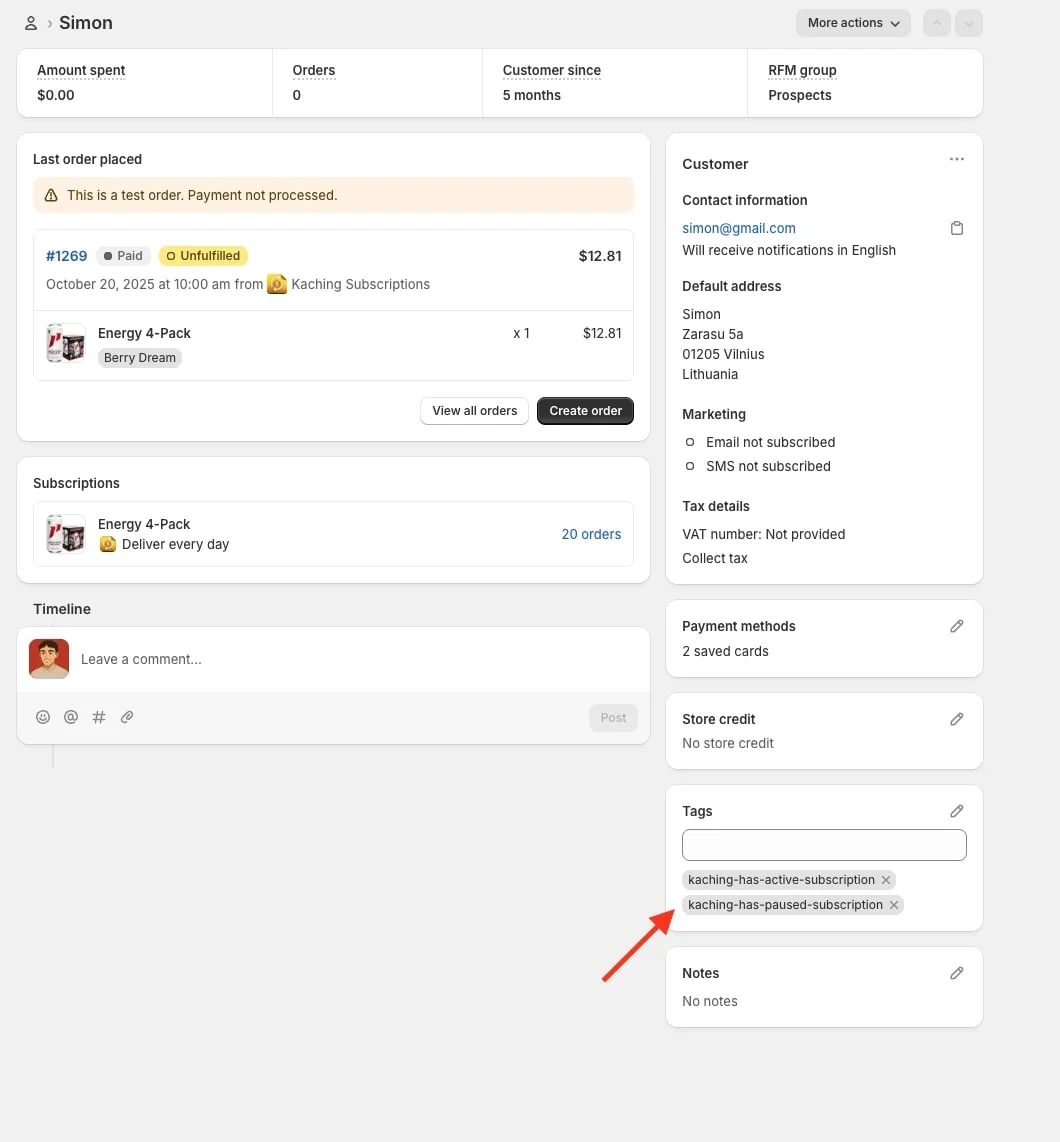
Note: Customer tags apply only to new or updated subscribers. Existing customer profiles will not be updated retroactively.
Creating Customer Segments for Subscribers
Customer segments allow you to group subscribers based on their tag.
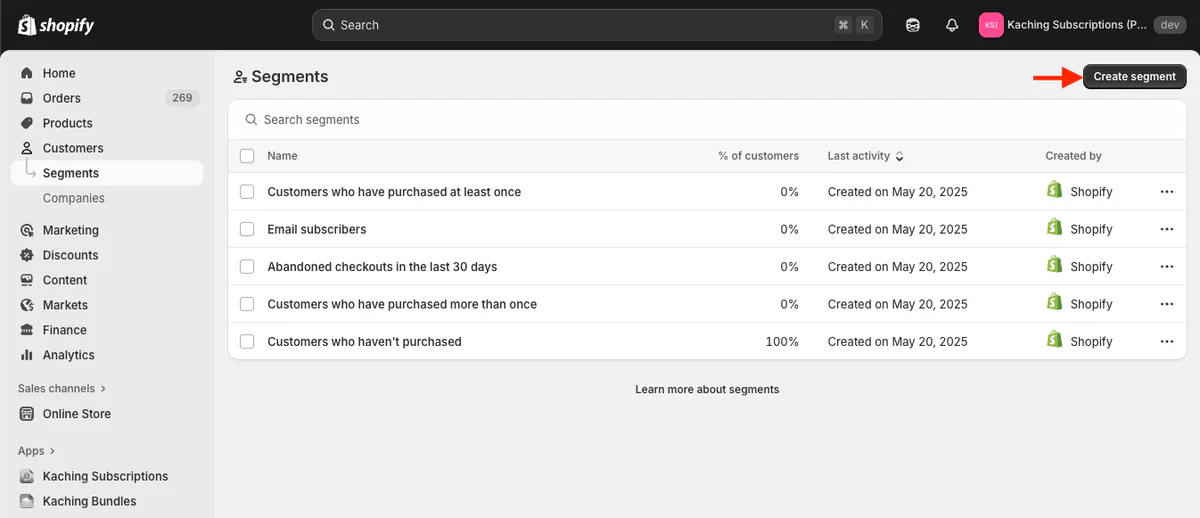
To create a segment in Shopify:
- Go to Shopify admin → Customers → Segments
- Click Create segment at the top
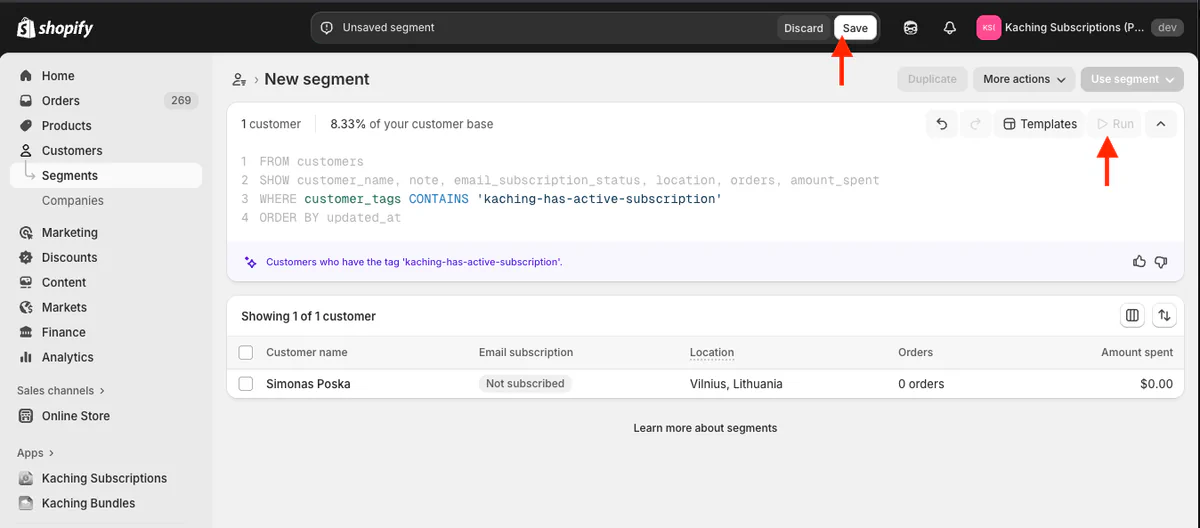
- Choose Customer tag and select one of the Kaching tags (e.g. kaching-has-active-subscription)
- Click Run
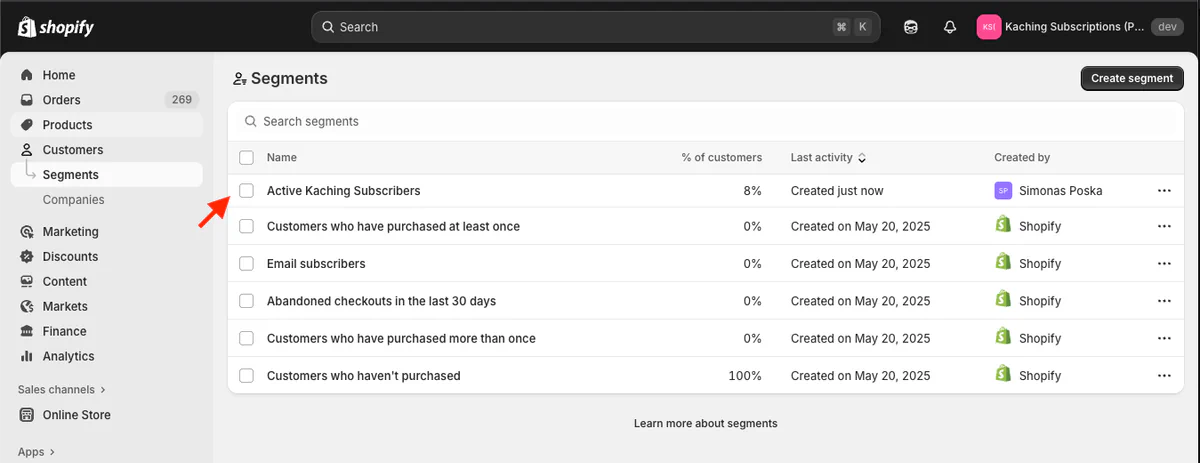
- Click Save, give it a name (e.g. “Active Kaching Subscribers”), and save.
You’ll now be able to access this segment anytime from the Customer segment menu in Shopify:
Example query for active subscribers
FROM customers
SHOW customer_name, note, email_subscription_status, location, orders, amount_spent
WHERE customer_tags CONTAINS 'kaching-has-active-subscription'
ORDER BY updated_at
Example query for paused subscribers
FROM customers
SHOW customer_name, note, email_subscription_status, location, orders, amount_spent
WHERE customer_tags CONTAINS 'kaching-has-paused-subscription'
ORDER BY updated_at
Example query for cancelled subscribers
FROM customers
SHOW customer_name, note, email_subscription_status, location, orders, amount_spent
WHERE customer_tags CONTAINS 'kaching-has-cancelled-subscription'
ORDER BY updated_at
Example query for subscribers who experienced failed payments
FROM customers
SHOW customer_name, note, email_subscription_status, location, orders, amount_spent
WHERE customer_tags CONTAINS 'kaching-has-payment-failure'
ORDER BY updated_at
Need help? Drop us a message in the live chat, and we'll sort it out together.
Related articles
How to combine a Kaching discount with a Shopify discountLearn how to combine Kaching Bundles discounts with other Shopify discountsBundles Kaching Subscriptions ExplainedKaching Subscriptions ExplainedSubscriptions
 How to integrate Kaching Subscriptions with GemPages Page BuilderLearn how to integrate Kaching Subscriptions with GemPages Page BuilderSubscriptionsHow to reposition / display Kaching Subscriptions widget in a page builder, landing page, or any other custom placement in the store.Learn about the Kaching Subscriptions widget snippet and its positioning.SubscriptionsHow to connect to Kaching MCPConnect Kaching to Claude, ChatGPT, or another compatible AI tool to ask questions about your store’s Kaching data.
Kaching Subscriptions ExplainedKaching Subscriptions ExplainedSubscriptionsHow to integrate Kaching Subscriptions with GemPages Page BuilderLearn how to integrate Kaching Subscriptions with GemPages Page BuilderSubscriptionsHow to reposition / display Kaching Subscriptions widget in a page builder, landing page, or any other custom placement in the store.Learn about the Kaching Subscriptions widget snippet and its positioning.SubscriptionsHow to connect to Kaching MCPConnect Kaching to Claude, ChatGPT, or another compatible AI tool to ask questions about your store’s Kaching data.