







Funnels: connect your upsell offers across checkout, post-purchase and thank you page
Decide what a customer sees next, based on what they did with your last offer.
SETUP A FUNNEL
- Create your offers first. You need offers on at least 2 different pages. You can pick draft offers, but customers see an offer only when it is published.
- In the app, open Funnels.
- Click Create Upsell Funnel.
- Give the funnel a name.
- In Choose upsells, click Select Upsell under each page and pick the offers you want to connect.
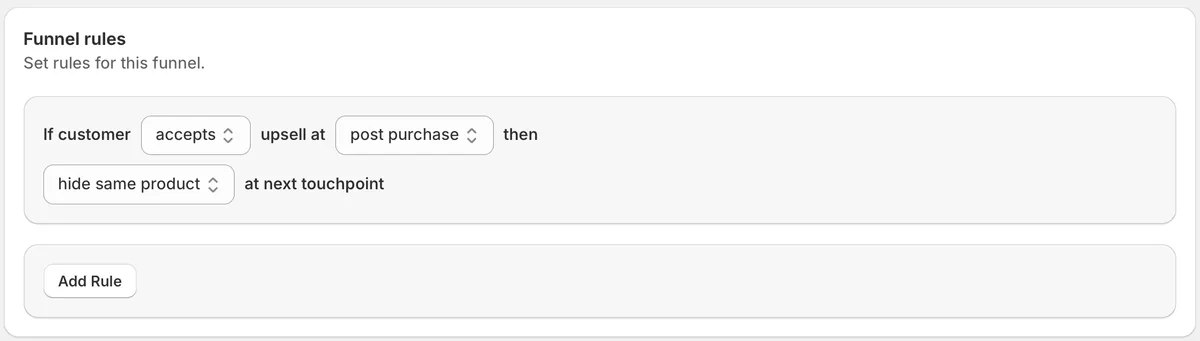
- In Funnel rules, set up your rule. A new funnel starts with one example rule. Change it to what you need. Click Add Rule to add more.
- Click Save & Enable. If you click Save as draft, the funnel stays off.
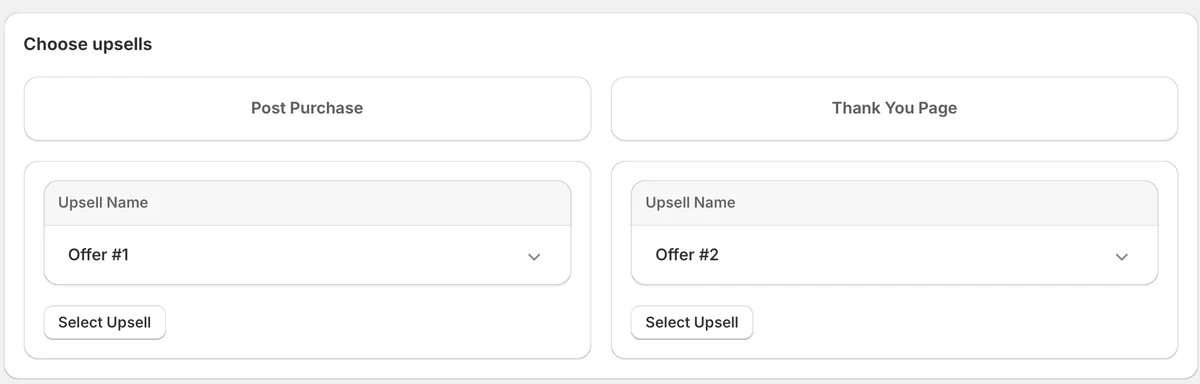
- Test it: place a test order that matches your offers' triggers. Accept or decline the first offer and check what the next page shows.
FAQ
Offer vs. funnel - what is the difference?
- Offer - one upsell on one page. It has its own trigger (when it shows), products, discount and design.
- Funnel - a set of rules that connects offers on different pages. It decides what happens on the next page, based on what the customer did on this page.
- A funnel is optional. Without a funnel, every offer works on its own. It shows each time its trigger matches, no matter what the customer did on the page before.
- A funnel can only hide or stop offers. It never makes an offer show. Each offer in a funnel still needs its own trigger to match.
- In the app, offers are called Upsells in the funnel editor ("Select Upsell", "Choose upsells").
How the pages connect?
A customer goes through up to 3 upsell pages, always in this order:
Checkout → Post-purchase → Thank you page
- Checkout - before the customer pays. Shopify Plus stores only.
- Post-purchase - right after payment, before the order confirmation. An accepted offer is added to the same order.
- Thank you page - the order confirmation page. An accepted offer is added to the original order and the customer pays the difference. An older offer that never turned on Add product to the original order, or turned it off, creates a separate order instead.
A funnel rule always looks at one page and acts on the page that comes after it. In the app this is called the "next touchpoint".
How customers interact with offers?
- Accepts - the customer accepted the offer (or its downsell).
- Declines/ignores - the customer saw the offer and did not accept it. This includes clicking "No thanks" and simply closing the page or moving on.
The three funnel rules logic
- Hide same product - on the next page, the products the customer just accepted are removed from the offer. With a declines/ignores rule, it is the products the customer saw and did not accept. The rest of the offer still shows. If no products are left, the offer is not shown.
- Skip upsell - the whole offer on the next page is not shown. Pages after that are not affected.
- End funnel - no more offers for this order, on any later page.
A rule reads like a sentence:
If customer [accepts / declines/ignores] upsell at [Checkout / Post purchase / Thank you page] then [hide same product / skip upsell / end funnel] at next touchpoint.
5 funnels that work
1. Do not offer the same product twice
- Post-purchase offer: Product A
- Thank you page offer: Product A + Product B
- Rule: If customer accepts upsell at Post purchase then hide same product at next touchpoint.
- Result: a customer who accepted Product A sees only Product B on the thank you page.
2. One "yes" is enough
- Rule: If customer accepts upsell at Post purchase then end funnel at next touchpoint.
- Result: after one accepted offer, the customer sees no more offers for this order.
3. A second chance with a better deal
- Post-purchase offer: Product A at 10% off
- Thank you page offer: Product A at 20% off
- Rule: If customer accepts upsell at Post purchase then skip upsell at next touchpoint.
- Result: customers who said no on post-purchase get a better deal on the thank you page. Customers who already paid for the 10% offer never see the 20% one.
4. Checkout first, then something new (Shopify Plus)
- Rule: If customer accepts upsell at Checkout then hide same product at next touchpoint.
- Result: the post-purchase offer does not repeat the product the customer just added at checkout.
5. Respect a "no"
- Rule: If customer declines/ignores upsell at Post purchase then end funnel at next touchpoint.
- Result: a customer who did not want the post-purchase offer gets a clean thank you page.